Wednesday, January 15, 2014

Avatar Review: Spider Productions Dragon Guardian


By Xymber Slade

Wandering around Second Life, these days I tend to wander the Social Islands, where new residents start out. In between dodging simcrashers, trolls, religious nuts, "free lindens, click here" signpost-wearing bots, and mic-screamers, I came across someone wearing a huge mesh dragon. It was really well done and when I found out the dragon was by Spider Productions, my interest was raised (as I have some of their original dragons and they do good work). Naturally, I hopped over to the Spider Productions mainstore to have myself a look.

Spider Productions makes quite a lot of things, from medieval armor and weapons, some jewelry, to multiple avatars (the Dragon Lord, an anthro shark, an anthro fox and a "freak" which looks like a rabbit-ized version of a Crux).

This newest mesh dragon of theirs is billed as "over one and a half years of blood, sweat, patience and experimentation" and quite honestly I think they did a good job. The dragon stands in at about three or four times the height of a normal human avatar (about the size of an adult Seawolf dragon, for comparison). It's very Godzilla-like in its bipedal form, which was a slight turn off for me but I quickly put it out of my head as I messed about with the HUDs. There are quite a lot of different options on an actions hud, 12 different dragon sounds (the roar of which they reuse from their original dragons, but I think that's a shortcut they're allowed to take), and they can both take a rider and carry people in their claws while flying (which is something I haven't tried yet).

The work that went into this avatar is plainly visible, and the only complaints I had while stomping around with it (there's a "stomp footstep" sound that can be toggled on and off) was that the anatomy looked a little weird and that the body shouldn't be supported on such short thin legs. Well tough, this is Second Life, things can look how we want them to look (grin) These dragons are also able to go into a quad mode (there's a shape and a mod attachment to move the feet to the right shape, though to me the movement makes it look like the dragon is crawling on his knees).

Overall, I think Spider Carnot (the maker of this dragon) outdid himself. Certainly they're much better than his original bipedal ones (of which I have a few). At 3000 $L, I think it's a bargain considering how much work obviously went into making this avatar work. I'm going to give it a full five dragon hoards out of five because to give anything less would be a crime. About the only bad thing that might be a put-off would be the price, but the price is reasonable. I ended up looking at the other dozens of dragons I have in my inventory and went to myself, "People are going to have to go mesh or go home..."

Spider Productions and the avatar itself can be found both on the Marketplace and at the Arachnid Island (129, 243, 376).

Xymbers Slade

Monday, January 6, 2014

Lost Second Life


By Becky Shaman/Joshua Xavier


This reporter has been featured in the last 7 articles published by Becky Shamen. He started out as an alt, but in November he split off into a seperate account and now is his own man. At the January Newser staff meeting, Josh attended in Sha's place and asked to be hired, so he could have his own Byline in the paper. At the meeting, Josh indicated that he and Sha were also working on a series of articles, a synopsis of "The Unveiling", by J.J.Dewey, which is being posted at ShaAdventures.blogspot.com , but they were also looking for new adventures in Second Life, to write about. The Editor suggested a photo exhibit, that he had heard of, might be just our cup of tea. The name of the exhibit is, "Lost Second Life." Josh, being a sorta Indiana Jones type, was on it like a mouse on cheese.

The landing, on the Mado sim, puts you in the center of a desert, said to be a post apocalypse sea floor. As the only building on the sim, you won't have any trouble finding the Anita Witt Photography Gallery. The main gallery features photos by Anita, which are all very high quality and copies are for sale. Behind the main gallery, there is a four story building, housing the "Lost Second Life" exhibit.

The photos in this exhibit are all by Photographer Ziki Questi, of sims that are no longer in Second Life. Knowing this premise, we were hoping there would be a photo from our all time favorite, the Sistine chapel, which disappeared last year. To our great delight, they not only included it, at L$100, it is the most affordable photo at the gallery.

We found the stairs difficult to navigate, but fortunately the building was missing one side and flying is permitted, making it easier to view all of the fine photographs.

As a life time artist, we can be somewhat critical of what some galleries have to offer. In the case of photographs by Anita and Ziki, we are pleased to report these are exceptionally good quality. No
doubt, some of you will find photos of sims that you have visited and now miss. Here is your chance to see them again and add reminders to the walls of your home.

Having, in the two months of our independent existence, evolved the persona of our new avatar, we were now planning to make a fresh profile pic. As we viewed each photograph, consideration was given as to how it would look as a background for a picture that fits our character. The one chosen fit both style and colors needed and now is included in the profile. From this slice of the visit, incorporated into my profile, it should be evident that we liked the exhibit. We give it two thumbs up and recommend y'all go check it out, before it goes away like the Lost Second Life it depicts.

http://slurl.com/secondlife/Mado/125/172/38

Joshua Xavier

Monday, November 25, 2013

Untangling Tango


By Becky Shamen

Today, we will be talking about BEWBS. In SL, females have a slightly different set of parameters that can be adjusted on their avatars. There is a setting that allows adjusting the breast size from 0 (pirate's dream-sunken chest) to 100 (OMG cup). As if that weren't enough, one can also buy add-ons, called prim breasts or implants. These can cost between L$800 and twice that. Like them or not, from my experience, they are a good investment. When I used them, as an "exotic" dancer, in adult clubs, I averaged L$600 per night in tips. They also inspired me to make and sell clothing for them, which brings in extra money even when I am not in world. I often log on to find myself a few hundreds richer than when I left.

Most implant clothing can be worn with or without implants. Implant clothing comes with "appliers", which, when worn, duplicate the texture of the clothing top (shirt, jacket or undershirt) on the clothing layer of the implants. My original clothing line was designed for use with Universal Implants brand, which was then the most popular brand. I also included a notecard with my products, called "the do it yourself guide to implants," in which I taught customers how to get the most out of their implants and even make their own clothes for them.

Now, the UI designer has quit SL and clothing for them is becoming hard to find. Since getting involved with Chest Treasures Mall, I have acquired a set of Lolas Tango implants, have added appliers to my original line and make all new outfits work with Tangos. Tangos are even easier than UIs to develop clothing for, so I offer the ladies some of the tricks I have learned, to enable them to make their own clothes and skin for them.


All SL clothing is based on templates. The Top Template is for Jackets, shirts, undershirts and gloves. The Bottom Template is for pants, underpants, socks and shoes. The Skirt Template is for skirts and jacket coat tails. Templates can also be used for making tattoos. Anything designed, using these templates, will fit any body shape. You can get these templates free, on line, by searching for "SL clothing templates." In the above illustration, we show the two layers used to make the black outfit, shown in the first image of this article. The bottom layer is the template. The top layer was made from a photo of the dress Beyonce wore at the Super Bowl half time show. I painted the gloves myself, to complete the look. When the clothing texture is finished, the template layer is turned off and the clothing layer is saved as a .PNG file. PNG files are the only type image that can be uploaded to SL and contain transparent areas. The areas in the above image, where you see the template, will show skin, in world.

Making Tango Appliers

The advantage of Tango implants is, the clothing layer uses the same texture as the one for the dress top. To make an applier, first go in inventory, right click the texture, and select "copy UUID number". All textures used in SL have a unique ID number. Now, make a copy of the applier that came with your implants and drag it to the floor to edit it. In the "content" tab, double click the "clothing configuration" file to open it. Replace the original ID number with your new one, then save and close the window. Now, while still in edit, rename the object to match the outfit it will go with, like "half time applier", then close the edit window. Now, a left click on the applier will put the texture on your implants and line up with the clothes being worn under the implants. Now, right click and take the new applier to your inventory. Make a copy to put in the same folder as the outfit. From here on, wearing the applier will put it on the bottom center of your screen. After clicking it, detach it, until the next time you need it.

Other implants work differently, but the above process will be pretty much the same for all of them. To assist my customers with other brands, I have always included the clothing top texture for them to work with.


Implants come with skin appliers, allowing them to be matched to any skin color on your avatar. However, there is no way they can include skins for furries. You could just make them the right color, but that would not match the 3D shading and variations of hair colors. To use implants with your furry, you will want to make a skin applier. The steps for making one are the same as for clothing appliers, but the texture template is different. The implants don't come with a template and the skin texture is no copy, so where do you get a template? Here is how I made my own skin template. While wearing the implants, right click and edit them. Check the box to edit individual prims and scroll to the skin layer, using [ctrl]+[.] or [ctrl]+[,]. In the "texture" tab, click on the texture image of the skin, which will show it about 1.5" square. Using a paint program that can capture images on screen, grab the screen shot and crop it to just the square skin image. To get good resolution on your planned furry skin, resize the captured skin to 1024x1024 (the largest size image SL allows to be uploaded). This is now your implant skin template.

Now you will need an image of your furry's chest area, to be fitted to the template. Wear the skin, then edit appearance, to hold your av still for a photo. Set your breast size to 0, so that the image will contain all of the breast area in a 2D image. Position your camera to get a close-up of the chest area. The area photographed does not have to be exactly like the template, as long as it contains the full breast and area up to the clavicle (collarbone). Save a HD snapshot to your computer. Copy this image to a new layer, above the skin template. Move and stretch the furry layer so that it overlaps the template in 3 key locations, the nipples and clavicle. When everything is matched up, save the furry layer as a PNG file and upload it to SL. The UUID number of this new texture will be used for making a new skin applier. In making the skin applier, follow the same steps used in making a clothing applier.

Your first time at making clothes, skins and appliers will take some time, but after the initial experience it gets much faster. Within a few months, you might be ready to open your own clothing shop.

Have fun getting busted.

Becky "Sha" Shamen

Wednesday, November 20, 2013

Second Life Historical Museum


By Becky Shamen

In my explorations of Second Life, I have covered many millions of square meters of space. For this adventure, we will travel in time and go back to the beginning days, when all of SL amounted to a mere 16 sims. I found the Second Life Historical Museum in the Destination Guide. The guide described it as follows.

Learn about the origins of Second Life and see displays of historical artifacts, images, and notecards that have been instrumental in shaping SL. Wear a free, fully-customizable avatar of our Primitar "ancestors" and relive magic from the early days.


The "museum" is an open air monument and, by panning your cam, the entire thing can be viewed, without taking a single step. In mid-December of this year, I will celebrate my 4th Rezday in SL. I have often wondered why I didn't start when SL first came on line. Now, having viewed it's early history, I can see why. With a life time of experience in art and design, early SL, to me, looks like something made from Leggo Blocks.

 Looking at this early street scene, it seems, back then, builders were limited to using basic primitives, like cubes, spheres, cylinders and cones. They had sculpts then, but nobody was very good with them yet. Today, we have mesh objects. Mesh is great for clothes and for limited use in scenery. While mesh does allow sim owners to have many decorations, using fewer prims, the trade off is increased lag. There have been many times that I have gone to a sim that sounded interesting, only to turn around and leave, because excessive use of mesh kept the place from rezzing and my av from being able to move. I wonder if lag was as big a problem, 10 years ago.

Early avatars, called `Primitars' at the museum, by today's standards, were scary monsters. I think  I would rather be bald than wear a hair do like this one. Thank goodness for flexi-prims. In one picture, I saw a dozen avatars, all sitting on the ground, with exactly the same pose. Today, with countless pose and animation balls, AOs, and avatar physics, motion has become very realistic. One can only hope that, ten years ago, with stiff, ugly avatars, they hadn't invented sex yet. That would be too perverse, even for my adventurous tastes.
 
This is the first Halloween party, held in Second Life. We have just ended the Halloween season and been to a lot of, so called, scary parties. If I had been around for this first party, I think I would still be having nightmares from it.

The next time you find yourself cursing Linden Labs, because you are still a cloud, the scenery isn't rezzing, you are only getting 1 Frame Per Second, or you've crashed three times in the last hour, remember, it could be worse. It could be 2002 and the big yellow duck wants to dance with you and take you home to his nest.

Phobos (229/151/33)

Becky "Sha" Shamen

Monday, November 18, 2013

The Gacha Show Premieres on Templar


By DrFran Babcock

I am not an oldbie, but I have been in Second Life™ long enough to have witnessed many ideas sweep the grid. Some come and go, and some stay. Right now gacha madness is in its ascendance, and few residents are without at least some awareness of what it’s all about.

What is Gacha?

The main gacha event is the Arcade Gacha ( http://thearcadesl.com ) held several times a year. Major content creators are asked to create a series of items, and place them in a machine where residents pay a fee to get the prizes that have been placed within. Most creators make one or a few items RARE, in that the odds of getting them are more difficult. The real coup in designing this event is that the items in the gacha machine are no modify, no copy, but transferable. This means, if you don’t like what you got in the machine, you can trade it for something else. An entire Gacha Culture has sprung up with residents running yard sales to sell their extra and unwanted items. In addition, some items that are RARE, especially items from earlier gachas fetch prices of several thousand Lindens! There is even an entire sim devoted to the sale, auction, and display of gacha items: Gachetopia.

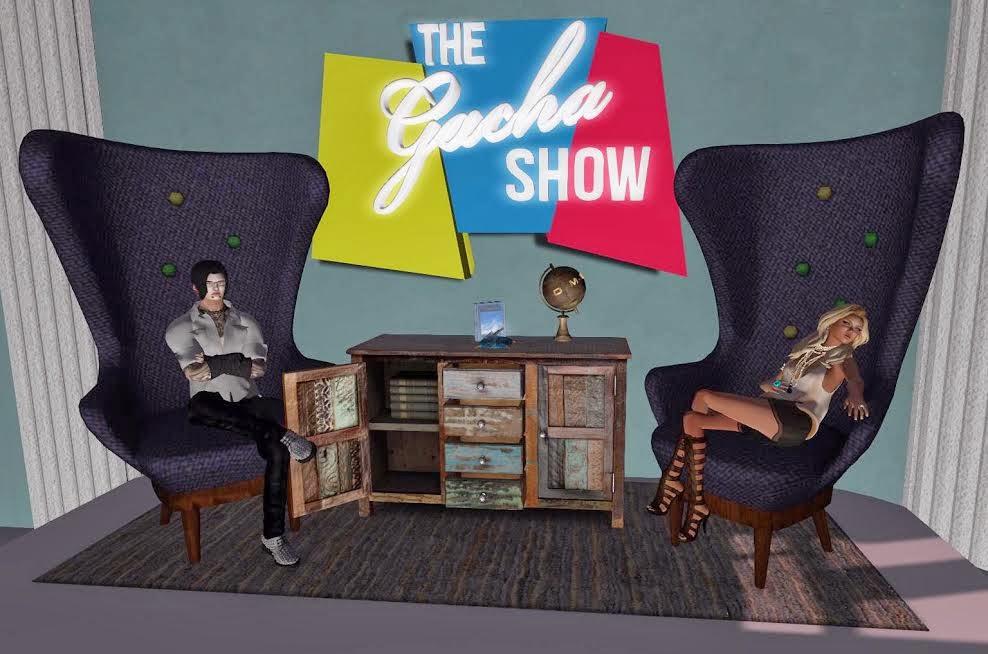
Gachetopia is a sim-wide yard sale along with several stores dedicated to selling items from the past gacha events. The sim is the work of Morbid and Luke Templar, who are dedicated gacha addicts. They have been selling items and holding auctions for a while now, but on Saturday, November 16th, they hosted the first of what should be many live shows called: The Gacha Show. Each show is planned to host a content creator, and an interview with them to explore their work, their lives, and their gacha goods.

I am fascinated always by the content creators with consistently innovative, detailed and improving work. For the first show Morbid Templar interviewed the genius behind O.M.E.N.: Damien.

Damien and O.M.E.N.

A sampling of the wise words of Damien is below. Damien was very measured and wise in his responses, and the crowd was clearly eating out of his hand. He even got a marriage proposal from someone in the audience by the end.

 I found out that O.M.E.N. actually stands for Ominous Meaning Elude No one, that Damien created as a comment on all the business names in SL that actually mean nothing.

Creative inspiration that might be saleable is hard to come by, and Damien admits that he does rely upon his manager, Aarin Jennifers, to help him with his creations. He has several ideas that were rejected by his manager  (farting tacos ), but he has held on to them for the future. His personal favorite gacha creation of his own is the Panda Sushi (http://www.flickr.com/photos/75496317@N07/8799819073/ )

Morbid bodly brought up the subject of the odds on the machines. My own experience has been that some RARES in the machines are harder to get than others, and my visits to yard sales have confirmed that certain objects are much harder to find. Damien felt that no RARE should be impossibly hard to win, especially if someone plays a machine very often.

He was asked what other creators he admired and he mentioned two of my favorites, Apple Fall and Anya Ohmai (Nu’ville), and one I didn’t know: Rose of Olive. Of great interest was the fact that all of the designers in the Arcade Gacha Group get free copies of the gacha items. This tidbit had the crowd murmuring in jealousy.

However, no matter how much the crowd begged, Damien would not let people know what would be in his December 2013 Arcade Gacha, but he had sage advice for new content creators: Be willing to embrace being small to be big.

FREEBIES!

A big surprise was announced after the show. Each person who had attended was treated to a detailed globe made by Luke Templar that was only for this show, and would be retired. In addition, Damien promised a free gift to the attendees of this first Gacha Show.

The next guest is already lined up, and is Contraption, who makes…well, contraptions. It is set for November 30th on the sim of Templar, and if it is run as professionally and welcoming as this first show, it will be a hit.

If you are interested in joining the Gachatopia group, you can teleport to the sim here: http://maps.secondlife.com/secondlife/Templar/121/179/41

DrFran Babcock

Friday, November 15, 2013

The CALL Art Exhibition Protest


By Bixyl Shuftan

On Sunday November 10, there was an art exhibition on the top floor of the Somnium Photo Art Gallery in the Greece sim. This exhibition was different as it was an artistic protest against Linden Lab: the C.A.L.L. Exhibition. C.A.L.L., short for Creators Against Linden Lab, had asked artists from across the Grid to make and donate works specifically for the show, "which property rights you will gladly grant on your own free will to Linden Lab." All the artwork was free for residents to take a copy, set for "sale" at zero Lindens, "as the content you have uploaded to SL is not yours anyway with the current LL TOS."

Dropping in, the top floor of the several floor gallery was full of the C.A.L.L. art, with several people there, including the exhibition host Walt Ireton. The artwork included "How to Stamp Out Creativity" by Em Larsso, a page with an international "not allowed" sign over it. There were a couple animated sculptures, "TOS Eats Art" by ChapTer Kronfeld, a "Pac-Man" like being that was constantly chewing prims, and would face whomever was nearby, and"The Copyright Monster" by Asmita, an ever-hungry tongue that kept flickering out, as if trying to reach for anything out there to devour.


Walk himself had made and donated a peice, "Property of LL," which had a paragraph of statement freely donating his "content" to Linden Lab, with an outline of a man sitting on a toilet.

Among those there was Trinity Yazimoto, one of the organizers of the "United Content Creators in Second Life" group. A favorite piece of art of her, and others, was "Once Upon a Time," which was a few words next to a picture of a wilted flower, "this one is really meaningful." Walt called it, "this is technically very good - the title I find a bit misunderstandable. 'Take our creativity not our souls.' Well, actually we dont want our creativity to be taken. ... The picture is great" "I like that without any words," a visitor commented, "it gives a message."

Another there was Chris Kayor. He had quite a few things to say in IM (most of which he gave permission to quote) and felt Linden Lab was out to tighten its grip over Second Life, both it's control and it's demand for money, "I believe that SL is indeed headed toward becoming ... pay to play," feeling basic accounts would soon no longer be free, and before long not only would third party Linden exchangers be banned again, but residents would no longer be able to sell Lindens back to the Lab, meaning the only ones who would be allowed to make real money from Second Life would be Linden Lab. And if longtime residents left, the Lab would not care, thinking they could easily replace them with newcomers.The UCCSL, while he felt was well intentioned, was in his opinion just being used by the Lindens to stall for time.

The exhibition will remain up at the Somnium Art Gallery until December 31st.

Greece (51/25/35)

Monday, November 11, 2013

Best Free Photo Studio


By Becky Shamen

Long before learning of Second Life, I was getting experience with posing and photographing avatars for graphic novels and videos, using a variety of software like Poser. Additional experience with CADD and paint softwares provided skills for designing, building, photographing and post production editing. With these experiences and skills, Second Life is a virtual painter's canvas/photo studio for me to create art works. Combine this usefulness with the social aspect of SL and the game, for me, is more than an alternative. It augments my real life. Now, as a reporter, I explore and tell others of places that will add to their joy, in both their real and second lives.

I had gathered a list of places to explore, from the Destination Guide's "photogenic" category, to prepare an article covering a number of them. The first sim on the list deserved a report of it's own.

Best Free Photo Studio

secondlife://GLENN/223/117/27

In the guide, each destination has a short introduction. This is what they wrote for this sim;

"As the name suggests, Best Free Photo Studio has free photo studios for public use. With a wide range of styles and locations, this is a great place for professionals, amateurs and students. They have some of the greatest photo equipment, poses and props available in Second Life. Whether you're looking for single poses, couples, even groups, come have some fun!"

At the sim landing, the first two things I saw were a TP to several of it's studios AND a free studio/pose stand, that looked very useful. We'll tell more about the freebie shortly, but first we'll look at what a photo studio is.

The above photo shows the main elements of any photo studio. In the center, there is a stand or pose ball. This is used to hold your avatar still, while you take the pictures. Behind the pose position, there is a background, called the "scene". These can be changed to other textures and each has a number of different ones to choose from. One of the studios, I played with, had 480 scenes. Each studio also has a menu, for making changes. Some have pop-up menus and others use boards, to one side of the scene, with menus on them. The menu allows you to change poses, scenes and lighting effects.

This sim has a number of different studios and you will want to make a LM and come play with all of them. The only limitation is that each has it's own poses and backgrounds and you can't change them. The photo to the left was one of my favorite poses and scenes, in the main studio.

In studio B, they have chairs in the studios, for making boudoir photos. I should mention here, I have a "Anypose Expression HUD", that lets me add facial expressions and hand poses, to add more to my photos.

After checking out this cool sim, I returned home to open my free studio and see what it had to offer. This device has so many great features, I don't know how I ever did without one. It's compact and only 9 prims. I can set it up in my living room, without moving any furniture. It comes with 18 poses and scenes and you can easily add more of your own. You don't even need to edit, to add scenes. While playing with it, I remembered a picture in inventory that would make a good scene. I opened the picture, to be sure I had the correct one. Without editing the studio, I dragged the image from it's window to the background and bang, there it was, ready to shoot. The studio also comes with 10 different colored lights and you can also use your own or the sim's lighting. I've already used it for  2 photos on my blog and I'm sure I'll be getting a lot more use out of it.

Becky "Sha" Shamen