Showing posts with label photo. Show all posts

Monday, July 31, 2017

Lichtbringer's 16 Fields and the LEA Photo Contest


By Klaus Bereznyak

The tripartite collective of Lichtbringer (Light-bringer) have been bringing light to the grid through their collaborations since they first got together in 2015. Their latest installation on LEA26 is called 16 Fields, a sim divided four by four into squares, each square hosting a unique offering of original 3D work.


​There's still time to to enter the Linden Endowment for the Arts (LEA) Photo Contest, open for entries until 17 August, and submit your best snap of this breathtaking show. I'm a sucker for a photographic challenge, so I loaded a roll, grabbed some lenses and set my coordinates to LEA26.

The landing point is in a cafe area (one of the 16 fields) with a well-stocked bar and equally well-stocked information points where one can find out about Lichtbringer and some of their other diverse work. Each member of the group, an artist in their own right, contributes unique skills to the collective. They work with handmade meshes, sculpts, prims, particles, lighting and scripts, endlessly experimenting with light. Beyond the cafe area is a surreal plane with tantalising cubic aurorae snaking overhead, snow falling upwards, shapes morphing and changing color. Whether you are a mouselooker or an ALT-zoomer, you need to get out and in among the lights.
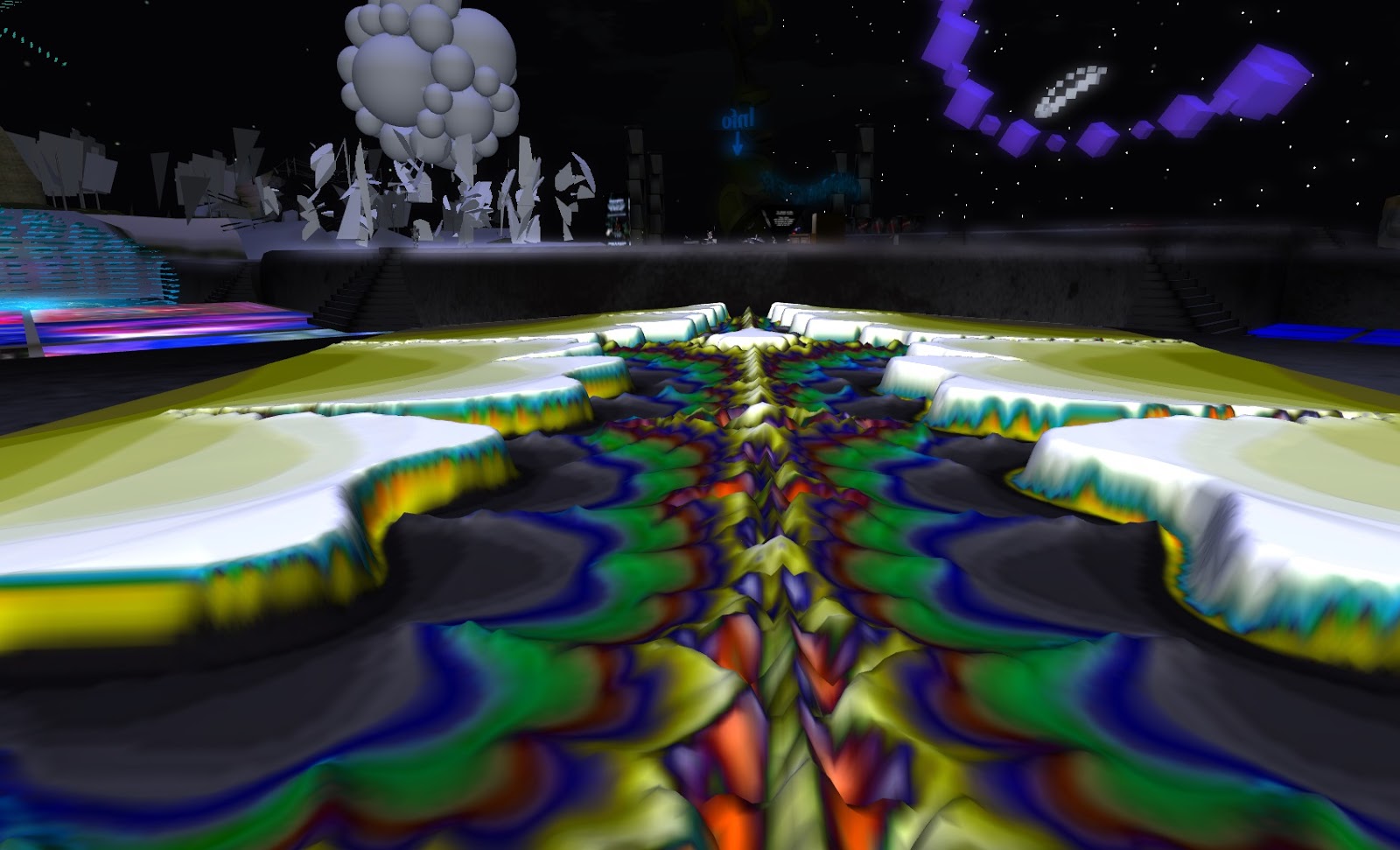

​Immersing here is like being in a continuous firework display that you can get up close to without being burned. I was a little overwhelmed at first, but there are only 15 more fields to see after you have had a drink at the bar, or a late breakfast. Three other AVs were lounging near the landing point and, no doubt, camming. I wandered off in the direction of what first aroused my curiosity, a seemingly dark and static piece, beyond all the swirling light, on a corner of the sim. 


A protester stands under a towering sculpture of the word "APOCALYPSE" with arms lifted in an open gesture. Surrounded by death and dryness, the figure seemed hopeless, but I wasn't sure what the message was here. Some of the fields contain sculpted words or recognisable symbols that hint at meanings but leave it open to interpretation. For all the light in play, the dark shapes in some of the fields are fascinating too.


Across the fields, the light, colors and shapes that are visible are constantly changing, so that no two moments will be the same, offering endless opportunities for a unique photo capture. The scale of the works ranges from a quirky assortment of colorful polygons in a sort of 'playground' on the NW corner to epic structures that dwarf any AV and can be flown through. For the best flying experience, I recommend the high, cubic lattice of point lights, filled with a morphing funnel of particles in the middle of the southern edge of the sim.


To participate in the photo competition for a 1000L$ cash prize and a unique, handmade "namehopper", one must submit a picture taken within the installation. Post-processing is allowed but not essential and there's no entry fee, so it seems open and not too fussy. However, make sure you read all the rules on the competition web-page, especially the detail on perms and how to submit. 


Nobody seems to know what a "namehopper" is, answers on a postcard? I was hoping I'd find the answer somewhere on the sim, and I know what I think it might be, but we shall see. 

Monday, November 11, 2013

Best Free Photo Studio


By Becky Shamen

Long before learning of Second Life, I was getting experience with posing and photographing avatars for graphic novels and videos, using a variety of software like Poser. Additional experience with CADD and paint softwares provided skills for designing, building, photographing and post production editing. With these experiences and skills, Second Life is a virtual painter's canvas/photo studio for me to create art works. Combine this usefulness with the social aspect of SL and the game, for me, is more than an alternative. It augments my real life. Now, as a reporter, I explore and tell others of places that will add to their joy, in both their real and second lives.

I had gathered a list of places to explore, from the Destination Guide's "photogenic" category, to prepare an article covering a number of them. The first sim on the list deserved a report of it's own.

Best Free Photo Studio

secondlife://GLENN/223/117/27

In the guide, each destination has a short introduction. This is what they wrote for this sim;

"As the name suggests, Best Free Photo Studio has free photo studios for public use. With a wide range of styles and locations, this is a great place for professionals, amateurs and students. They have some of the greatest photo equipment, poses and props available in Second Life. Whether you're looking for single poses, couples, even groups, come have some fun!"

At the sim landing, the first two things I saw were a TP to several of it's studios AND a free studio/pose stand, that looked very useful. We'll tell more about the freebie shortly, but first we'll look at what a photo studio is.

The above photo shows the main elements of any photo studio. In the center, there is a stand or pose ball. This is used to hold your avatar still, while you take the pictures. Behind the pose position, there is a background, called the "scene". These can be changed to other textures and each has a number of different ones to choose from. One of the studios, I played with, had 480 scenes. Each studio also has a menu, for making changes. Some have pop-up menus and others use boards, to one side of the scene, with menus on them. The menu allows you to change poses, scenes and lighting effects.

This sim has a number of different studios and you will want to make a LM and come play with all of them. The only limitation is that each has it's own poses and backgrounds and you can't change them. The photo to the left was one of my favorite poses and scenes, in the main studio.

In studio B, they have chairs in the studios, for making boudoir photos. I should mention here, I have a "Anypose Expression HUD", that lets me add facial expressions and hand poses, to add more to my photos.

After checking out this cool sim, I returned home to open my free studio and see what it had to offer. This device has so many great features, I don't know how I ever did without one. It's compact and only 9 prims. I can set it up in my living room, without moving any furniture. It comes with 18 poses and scenes and you can easily add more of your own. You don't even need to edit, to add scenes. While playing with it, I remembered a picture in inventory that would make a good scene. I opened the picture, to be sure I had the correct one. Without editing the studio, I dragged the image from it's window to the background and bang, there it was, ready to shoot. The studio also comes with 10 different colored lights and you can also use your own or the sim's lighting. I've already used it for  2 photos on my blog and I'm sure I'll be getting a lot more use out of it.

Becky "Sha" Shamen

Wednesday, September 25, 2013

First Impressions


By Becky Shamen

Making a Good First Impression
Image Essentials

How many times has this happened to you? You're in a club, shopping, or just exploring a new sim, when, out of nowhere, an IM comes with just one word; Hi. Zooming out your radar, you find the sender has just entered chat range and is comming closer. Several things happened, before they decided to start a conversation. They probably spotted you first as a green dot, on their radar, and wanted to see who was on the sim with them. Next, they zoomed their cam in on you, from a safe distance, to check out your gender, clothing statement and face. Now, to come up with an ice breaker, they check out your profile, to see if you have any interests in common and get a better first impression of you. At the top of your profile, the first thing they see is your profile picture. It's amazing how few pay attention to this important first impression. Getting a good profile picture can be expensive. Just taking a snapshot is not enough. You need a good image editing program, like Photoshop or Paint Shop Pro, which are expensive to buy. Alternatively, you could hire an artist to make one for you. Don't expect to get them to do it free. They have a lot of projects going for themselves already. Many of us don't have money or enough to pay for a good profile picture. My experience with Graphic Arts starts from my grandfather, a sign painter and fine artist, and is developed through school and on the job experience. Using that, in writing this article, I am going to show you how to make a good first impression, profile pic, for FREE.

Camera Tricks
Many of us have already learned how to aim and zoom the camera. You can zoom in and rotate the camera to any point on a sim, called "Perv cam", if you know a few simple tricks to control the camera. To start, you could just turn your av in the direction you wish to view and use the mouse wheel to zoom in and out. However, when you get to your back, the cam switches to mouseview, the equivalent of looking through your avatars eyes. To move the camera, without changing your av's position, hold the [Alt] key down and left click the person, object or wall (not sky) you wish to focus on. Now, as long as you keep the [Alt] down, the movement of the mouse will zoom in or out and rotate (pan), left or right, on the point selected. If you need to pan up or down, add the [Ctrl] key, while still holding the [Alt] down. Using these two keys, you can get a close look at anything you can click on. I use this trick often, when exploring new sims, to save having to walk so much. This is also very usefull for setting camera position and zoom for a good picture of yourself. Close ups make much better profile pics than full body shots.

Posing for the camera
By default, avatars are never still. To make them look alive, slight movements are added. Wearing an AO makes you look even more lifelike, but it's hard to get a good picture of a moving target. Editing appearance will freeze your av and is good for fine tuning the objects you wear, but it sucks as a camera pose. Camera studios have a selection of poses and backgrounds to use. To pose with a background from your own favorite sim, there are poses you can get for your inventory, for sale and/or free. Clothing, hair and skin show your beauty, but a good pose shows your attitude.

Lighting
This is also an important part of getting a good picture. Viewers come with a selection of lighting choices. Some, like "Nirans", have a larger selection. For a good photo, you need more than just ambient light. Photographers use additional lights to remove shadows, light the background and create mood and depth. You can buy lights, but making your own is free. To make a light, first rez a sphere, or any other prim, then edit it. In the texture tab, make it's texture invisible, then open the features tab and click the box to make it a light and set it's color, intensity, radius and fall off (fading with distance). In locations where you can rez things, place the light where needed. In no rez locations, wear the light and then edit it's location. You can't edit things that are invisible, so to find and edit your light push [Ctrl]+[Alt]+T at the same time. This makes all invisible objects appear as translucent red, letting you click and edit them.

Backgrounds
In a photo studio, there is a button that lets you select from an assortment of backgrounds. If you prefer to use a background, from in your home, favorite club, or scenic sim, just walk up to the location and turn around. If you want to use a favorite picture or image from your hard drive as a background, there are two ways to do it. You can upload the image, for $10, and make it a texture on a large box and pose in front of it. Alternatively, you can use, what the industry calls, a "green Screen", by making the box a solid green (or other color close to the color of the image that will be your background). Before adding your snapshot as a new layer, above the desired background, the green can be removed easily, then stray colored pixels can be erased individually.

Taking your best shot
Setting up the scene, pose, lighting, and camera position takes a long time. If, for some reason, you don't like the way the photo came out, when you go to work with it offline, setting up for a new shot will take a lot of extra time. Since saving the photo to your hard drive is free, try changing things and taking as many shots as it takes to get what you want. On the photo shoot for my new profile pic, I took 12 photos and ended up using the last one. You'll thank me for this tip.

Finishing up
Here is not the place tell explain how to use your editing software. That would take a whole book. What should be remembered is that profile pics are square, so you will need to crop your picture to a square, before uploading it to your profile. If you upload a rectangle, it will be squeezed to fit and ruin all your work and leave a bad impression on those that view it. As a final note, here are two free softwares that you can get on the internet, for making and editing pictures.

QAvimator is for making animations and poses, which can be uploaded to SL.

Paint.NET works like Photoshop and Paintshop Pro, but it's easier to use and free. I use it also for making clothing textures.

I hope my tips will help you make a good first impression. If you have questions, find me inworld and I'll be glad to help.

Becky "Sha" Shamen

Friday, November 18, 2011

More on the "1000 Avatar Project"

Gracie Kendal danced in paint speckled jeans and a comfy top surrounded by the towering 1000 Avatar exhibit. Her friends danced right along with her at a pre-release party for Volume 2 of her book.

Kendal's photography focused on the concept of online identity: what it means to present ourselves in a virtual manner, how we fashion our avatars and why.

It began with a Second Life group show held on Caerleon Island called "Ambiguity of Identity.” Back in 2010, several SL artists worked together on the project.

"So we were already having this conversation about identity in Second Life," said Kendal as we sat in a social area a day before the party. We were surrounded by the avatar pictures beyond what your camera could observe. One literally had to cam upward and around to see the entire exhibit. "I can't remember the exact moment or inspiration...most of my artistic work is spontaneous. But when I come up with these ideas, I just go with them immediately.”

"Second Life allows us to be what we are in the inside. We understand what it means to don a persona, an identity, a personality, a mask, an avatar and either be someone else, or explore another aspect of ourselves or find our true self. Avatars are amazing inventions," Kendal mentioned.

What began as a collection of one hundred portraits to illustrate the idea of online anonymity, evolved into a documentation of SL avatars. She began her project Oct. 23, 2010 and finished it Nov 2, 2011.

"The portraits record a moment in their lives of more than a thousand people who are, to me, fearless," she explains about her first book. "These people have put themselves out there into the brave new world of virtual environments as explorers searching for anything and everything. They are amazing, creative, soulful people who I am so honored to have in my project."

The project is immense. You have to see it to believe it. It's 2,438 prims, 100 x 100 meters across and 68 meters tall. Kendal knew what she wanted to do because her Masters Thesis show featured portraits done of herself as part of a transition for the project as "My Life as an Avatar." She had before and after portraits in real life where she stood in front of a gray background.

"Initially I set up a little platform above my studio and started Iming people from my friend's list," she said. "Within a week or so I had about 100 avis. Then I started putting out notices in the groups I am in, as well, asking friends to tell their friends. Then the installation got into the destination guide and I started getting IMs and emails asking to participate. It has been a steady stream of people ever since."

The project was mentioned in the Second Life group on Facebook and that has increased exhibit visitors. She had to take a break from shooting for awhile because of computer issues, but when she came back, she moved full steam ahead on finishing meeting her goal of 2000 avis. She just reached the goal last week.

What did she learn from the project? That would be how important this is to the history of Second Life.

"Especially because Second Life isn't the buildings, art or clothes, it’s the people who are here who make this world what it is," she told me. "I'm really honored that they would want to be part of this."

She thinks these avatars stand proud and represent so many more who covet their online identities.

"A big part is also anonymity," she mentioned. "So it’s stressing the idea that we can come here and be whoever we want." Asked if she sees a pattern emerge in avatar use she replied, "I noticed a lot more women or women avatars, definitely more human."

Kendal self published her book, “1000 Avatars” so she could have control over every aspect of it. She dedicated the first volume to a dear friend of hers, the late Delinda Dryssen. The 160-page softcover book was published May 31, 2011. It sells for $62.95. Email her to order it at krisartlvr@verizon.net.

For more information, log on to www.graciekendal.wordpress.com.

Netera Landar