10 Gooson sent Second Life Newser a few notes about her experience with Mesh, "I've tried to explain what meshes are, what is still unknown, the in's and out's for 'almost-noobs' to explain some more about meshes."
*Addition* 10's original article had been delayed, so she sent over an updated one which reflected her more recent experiences.* * * * * * * * * * * * * * *
* There are prims, sculpted prims and mesh-prims, well known as the avatars as we all are inworld. yes, an avatar is called a mesh. A 1 non-linked object that can move, you can bump into and walk over! that has flexible (mesh)clothes and can be textured with a Template or officially called uv-Map.
* Till this summer the avatars are the only existing Meshes in SL, but that has changed forever! by the implementation of meshes in SL.
* A mesh is a 3D object that can not be created or build in SL itself like ordinary prim builds as we're all used to.
* Like Sculpted prims they need to be created outside SL with 3D-software programs. Unlike sculpties, meshes can move with the avatar's body if they are 'rigged' (= attached to) properly to the bone-structure of an avatar. So 'flexible clothes' is possible, because they are made out of meshes instead of sculpties, which can not be made flexible or attached to a bone-structure of avatars.
* Mesh objects/3D-objects can be of any kind, a complete house or castle, avatars in any shape you can think of, trees, you name it. You can walk through them, on top of them etc, what can not be done by sculpted objects. (Sculpted prims are impossible to walk on or through if not made phantom guided by invisible helping prims, can not be made flexible, even if attached.)
* Mesh objects can be downloaded from the internet and be uploaded in SL gridwide. This will cause lots of copyright infrignements. Real life 3D designers will feel the effect of ignorant SL-residents who upload these mesh-3D-objects they've found on the internet, without paying any respect to license-agreements etcetera!!!
* Meshes can only be textured by using the UV-maps or Templates made available by the designer of the meshes and are not easy (impossible) to texture without any knowledge of graphic programs.
* Till now (end of september 2011) meshes imported to SL for the use of avatar-attachement (clothes and accessories) can not be resized and have to be sold in a few default sizes as Small, Medium, Large and extra Large. An extra big bum will be impossible to use with a mesh-skirt worn!! So for mesh-clothes residents will need to resize their shape and not much residents will be willing to. Their biggest complaint about meshes so far!!!!
* The forout spoken advantage of meshes primcount is unsure and still a big mystery (time of writing end of june 2011) while LL has tried to bring the implementation of meshes as being a prim count advantage. As a sculpted prim object, the shape can be 2 prims, imported as mesh-prim it can be 4, 6, 8 or 2 prims as well, even less as just 1 mesh object having a Prim Equivalent of 1!! So the only advantage till now is the incredible Level of Details for every 1 prim Mesh Object and for each 1 prim Mesh Object 8 texture faces. (A default prim Box has 6 texture-faces)
If a mesh-object is resized as a huge prim, it will be multiplied in primcount and still the primcount calculation isn't sure. If you add a script, the prim count will go up!! To script and or animate a mesh object, it is best to delink the scripted(mesh) prim and add it separately and use it as unlinked (coalesced) object. What will be difficult for mesh-clothes (again) and for the average user of SecondLife.
* Upload existing meshes not specifically build for SL means the following; LOD factor (Level Of Detail) needs to be adapted for the use in SL. The creator of the mesh needs to have adapted his mesh for the use in SL, this means the creator has to create 3 or 4 different meshes to establish 1 good mesh object inworld. From every distance such good meshes will be loaded properly by SL itself. If not, the object will look terrible from a small distance even if the standard LOD-factor is set to 4 or higher in your viewer's preferences. This is NOT known by the average user of meshes, creators of meshes or people who upload good looking meshes not specifically made for the use in SL. Only the 'happy' few are aware of this fact and it takes a lot of time and skills to create meshes with the good LOD-factors for the use in SL.
* The problem is and will be the coming months, is that, even in the Beta grid, nothing is sure, no conclusions can be drawn and it is all 'wishful thinking' for LL, skilled designers, business owners and residents who hope for good improvements...
*****Current experience:
Mesh-clothes are a huge disappointment for most creators and users! The resize-issue is an important part of the disappointment.
Big mesh-objects as rocks, caves, complete islands, trees etc have a prim-count problem. Even when the mesh is 'low-poly' (less tris as they call it) LL has decided to keep this stupid bug-like mistake and gives such bigger objects a primcount of a few hundred!!! or more. So the advantage of walking on or in such bigger builds without helping prims being 1 mesh object is gone and a huge disappointment for landscapers (ask Luna Bliss or Lilith Heart, Jubjub Forder). They look smashing but unable to use!!
So what's left?? Normal mesh-avatar-attatchements that don't need to move with the body of avatars, for example belts, helmets, armory, bags, etc etc. They behave the same as sculpted attachments, but again; much more room for details in the shapes themselves AND the multiplied texture-face-space meshes have compared to sculpties that have only 1 texture-face!!
For us, my hubby, it means we focus on furniture. Already awesome sculpted furniture, mesh furniture is 'fantastic', very very very good in quality and my experience; much more easy to texture because of the extended texture faces per mesh-part of a build!
I'll send you some of our own.
VIEWERS!!!!
Only the SL-viewer 3.0 and higher and the Phoenix-Beta viewer Firestorm V3 are supporting meshes. (last is extremely slow)
That means the 90% of SL-residents who use Phoenix or other third party viewers don't even see meshes as they are. Here some examples:
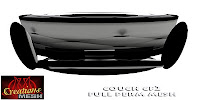
(pick taken with SL Viewer 1.23)
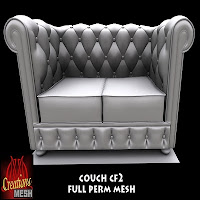
(pick taken with SL Viewer 3.0.3)
Well known is; Phoenix is working hard to support meshes, i assume (dangerous) that other viewers do the same.
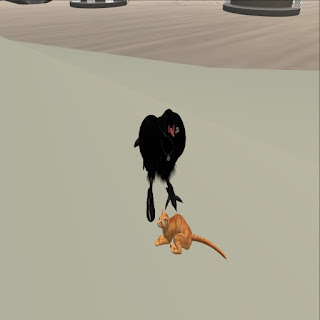
The crow is a sculpted avatar, the cat is Sparky-me AND a mesh avatar!
*All stated above is written by mesh-noob herself, involved by an average 3D designer who is trying to involve himself into mesh-for-SL-use for 2 years. That the SL-mesh-forum is filled with questions, complaints, frustrations and unanswered questions will be confirmed if you visit all SL-mesh information sites available. It is all very technical, but even for the designers themselves no clarity is given or available.
http://wiki.secondlife.com/wiki/Meshhttp://wiki.secondlife.com/wiki/Mesh/What_is_mesh%3Fhttp://wiki.secondlife.com/wiki/Mesh/Costs_and_fees10
 Aside from location, key factors for renting are how much will it cost
and how many prims will be allowed in the rented area. Regardless of how
many prims are allowed, by the time your home starts feeling like your
personal piece of heaven on earth, you'll be wishing for a few dozen
more prims. Over the years, I have found a number of ways to save prims,
while still decorating to get my home to be an extension of my
personality. I'd like to share some of what has been learned, in this
article.
Aside from location, key factors for renting are how much will it cost
and how many prims will be allowed in the rented area. Regardless of how
many prims are allowed, by the time your home starts feeling like your
personal piece of heaven on earth, you'll be wishing for a few dozen
more prims. Over the years, I have found a number of ways to save prims,
while still decorating to get my home to be an extension of my
personality. I'd like to share some of what has been learned, in this
article.


